The bones are good, but this theme is a work in progress.
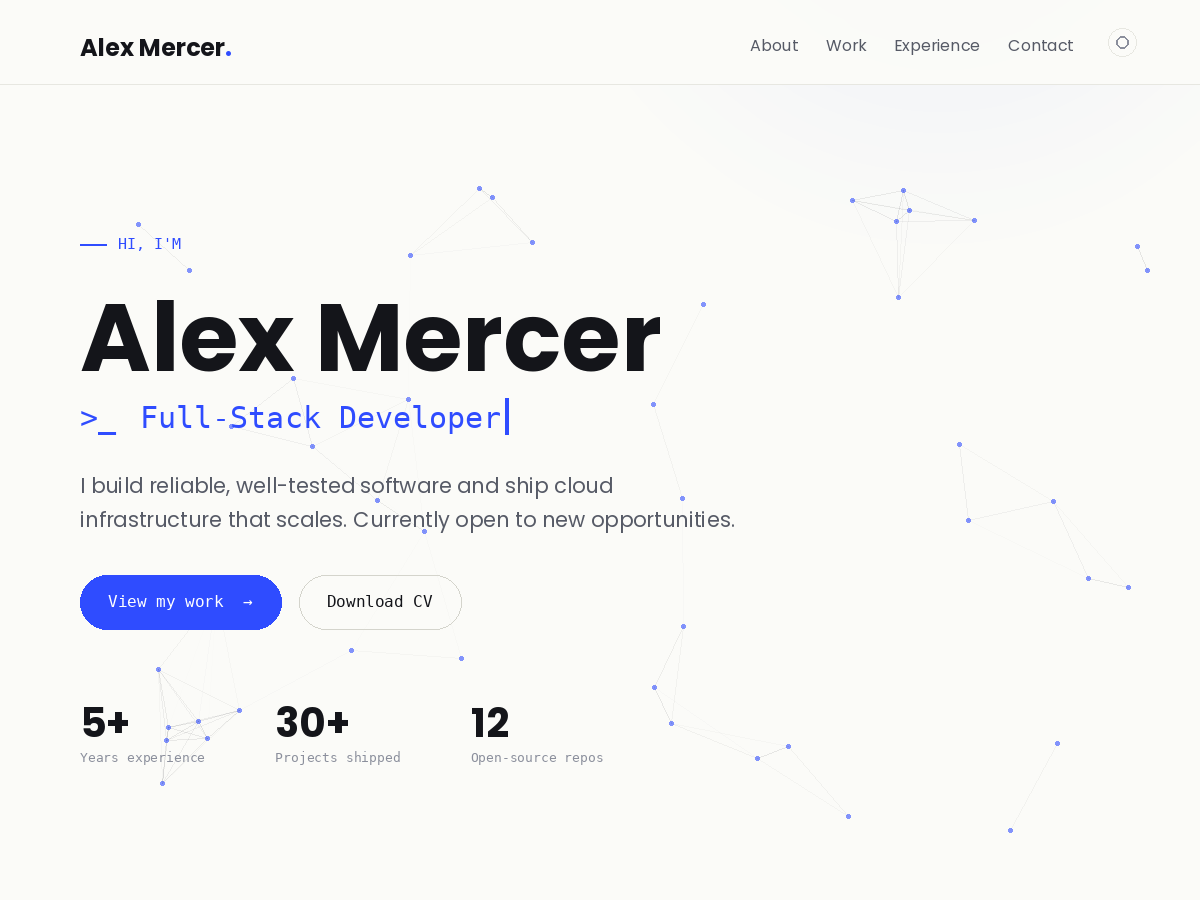
# Codex Theme — Version History

A running log of every released version of the **Codex** WordPress theme and the
changes made in each. Newest releases are listed first. The change categories are:

- **New** — a feature or option that did not exist before
- **Change** — an adjustment to existing behaviour, layout, or styling
- **Fix** — a correction to a bug or broken behaviour

**Current version:** 1.6.2

---

## Overview by series

| Series | Theme of the work |
| --- | --- |
| **1.6.x** | Per-entry "Codex Display Options" (file embeds, colour, fonts, width), and a richer block-editor type system |
| **1.5.x** | Header alignment polish, front-page spacing consistency, a reusable inline-PDF option, and a run of rendering/visibility bug fixes |
| **1.4.x** | Header restyle and resizing, hero spacing and side-animation work, opacity controls, side rails, and several button/anchor fixes |
| **1.3.x** | Menu layout and wrapping system, the hero glow/animation tuning, the PDF shortcode, and the critical 500-error fix |
| **1.1.x** | Reliability fixes for the theme toggle and social icons, tighter section rhythm, and the first inline PDF viewer |
| **1.0.0** | Initial release |

> **Note on 1.2.x:** the 1.2 series consisted of exploratory builds that were
> rolled back rather than released, so the stable history moves directly from
> 1.1.1 to 1.3.0.

---

## 1.6.x — Per-entry display options and a richer editor

### 1.6.2
- **New:** an **"Underline hyperlinks in content"** option (Customize → Design).
  On by default; switch it off to drop underlines from links inside pages, posts,
  and projects.
- **Fix:** button-styled links — the theme's `.btn` and the block editor's Button
  block — are no longer underlined inside content. A download button (e.g. one
  linking to an embedded `.html` file) now renders cleanly with no underline,
  whether or not content underlines are enabled.

### 1.6.1
- **New:** a **"Use the hero gradient on all pages"** option (Customize → Home –
  Hero). With it on, the home page's accent gradient glow becomes a background on
  every page, project, and post — existing and new — while the animated
  constellation/grid visual stays on the home page only. The glow follows the
  active accent colour, so per-entry accent overrides tint it too.

### 1.6.0
- **New:** a **"Codex Display Options"** panel when editing any post, page, or
  project — per-entry customization with no code:
  - **Embed a file:** pick or upload a **.pdf** (inline viewer) or **.html** file
    (sandboxed frame), with a caption, before/after-content placement, and an
    adjustable height. Other file types fall back to an open/download button.
  - **Accent colour** override for that entry (colour picker).
  - **Heading and body font** overrides — Sora, Hanken Grotesk, JetBrains Mono,
    System, or Serif.
  - **Content width** — Standard, Wide, or Full.
  - **Hide the page header** (title block) per entry.
  Overrides are scoped to the individual entry, so they never leak to the rest of
  the site.
- **New:** the block editor now surfaces the theme's full type system — a
  **font-family picker** (Display, Body, Mono, System, Serif) plus weight, style,
  letter-spacing, text-transform, line-height, and drop-cap controls — next to
  the existing Codex colour palette and font sizes, so colour and font can be set
  per block.
- **Fix:** corrected an invalid `theme.json` key that had been disabling the
  editor's line-height control.

---

## 1.5.x — Alignment, spacing consistency, the PDF option, and rendering fixes

### 1.5.7
- **Fix:** hardened the contact form against spam. The honeypot-only check
  introduced in 1.5.6 let bots through — both those that fill only the visible
  fields and those that POST straight to the server. The form now also requires
  proof that a real browser executed the page JavaScript plus a short dwell time,
  and uses a stronger honeypot, which together block direct automated posts. The
  notification subject is now "Contact form: <name> — <site>" so
  genuine messages are obvious at a glance. Visitors without JavaScript still have
  the email link; if spam persists, pair the form with Akismet or a captcha.

### 1.5.6
- **New:** the theme ships with a ready-made **"Codex Menu"** — the default
  in-page links (About, Work, Experience, Contact) created as a real, editable
  menu and assigned to the header automatically. It shows up under Appearance →
  Menus and in the Customizer, so links can be added, renamed, or reordered on
  top of the existing set instead of building a menu from scratch, and the same
  menu can be dropped into the footer. A menu already assigned to a location is
  never overridden, and in-page anchor links now resolve correctly from inner
  pages too.
- **New:** an optional **contact form** in the contact section (Customize → Codex
  Theme Options → Home – Contact). Shown alongside the email link, it matches the
  theme's styling with floating labels, submits without a page reload, and emails
  each message to a configurable recipient (falling back to the contact email).
  Includes honeypot spam protection and a no-JavaScript fallback.

### 1.5.5
- **Removed:** all inline PDF viewers and every option to embed one. Gone are the
  interactive PDF preview in the Experience section, the "Show interactive inline
  PDF viewer" customizer option, the per-entry "PDF Document (Codex)" meta box on
  pages/posts/projects, and the `[codex_pdf]` shortcode. The "Downloadable CV
  (PDF)" upload and the "Download full CV" button remain — the CV is now offered
  purely as a download and is never embedded in the page.

### 1.5.4
- **Fix:** page content could appear briefly and then fade away, leaving only the
  header. The scroll-reveal effect required 12% of a section to be on screen
  before showing it, which a section taller than the viewport (e.g. a long page)
  can never reach — so it stayed hidden. Content that is in view now reveals
  immediately and can no longer get stuck faded out; only sections still below
  the fold animate in on scroll.

### 1.5.3
- **Fix:** a Page assigned as the blog "Posts page" (Settings → Reading) now
  shows the content added to that Page above the post list. Previously the
  archive template rendered only the title and the list, so any intro content
  appeared to vanish. Regular Pages were unaffected and continue to display
  their content normally.

### 1.5.2
- **Fix:** the closed mobile dropdown menu no longer leaves a thin sliver of its
  background visible at the very top of the page, where it had been overlapping
  the menu button and theme toggle. The menu was anchored 72px down (below the
  header) but only slid up by 120% of its own height, which was not enough to
  clear the viewport on shorter menus. It now slides up by its full height plus
  the header offset, so it hides completely regardless of how many items it has.

### 1.5.1
- **New:** a "PDF Document (Codex)" box in the editor for pages, posts, and
  projects embeds the inline PDF viewer on that entry — with a custom viewer
  label and a before/after-content position — alongside the existing Experience
  viewer and the `[codex_pdf]` shortcode.
- **Change:** standardized the spacing rhythm across all front-page sections
  (the eyebrow-to-title and title-to-content gaps) so every section reads as
  balanced as the hero, on both desktop and mobile.

### 1.5.0
- **Change:** menu items are now explicitly vertically centered within the
  header bar, with a tightened link box. The links had been inheriting a large
  body line-height that made them sit loosely in the taller header.

---

## 1.4.x — Header restyle, hero spacing, opacity controls, and side rails

### 1.4.9
- **Change:** rebalanced the hero's vertical spacing — tighter, even spacing for
  the greeting/name/role cluster, and equal space above and below the button row
  so it sits symmetrically between the tagline and the stats.

### 1.4.8
- **Change:** nudged the hero action buttons ("View my work" / "Download CV")
  down by 5mm.

### 1.4.7
- **Change:** the header bar is 50% taller, with the logo, color-scheme toggle,
  and menu text scaled up proportionally. The anchor scroll offset and the mobile
  dropdown position were updated to match.

### 1.4.6
- **New:** fixed side rails on large screens (≥1280px) place the social links and
  contact email in the left/right margins with a thin framing line, giving the
  empty margin space purpose and drawing focus to the central content. Hidden on
  mobile and tablet.
- **Change:** tighter spacing on the single project template — less gap between
  the project title and its content, and between the "All projects" link and the
  footer.

### 1.4.5
- **Change:** reduced the empty space above the hero greeting (less vertical
  centering air and a smaller top padding), bringing the intro closer to the
  header.

### 1.4.4
- **Change:** tighter header — the bar hugs the logo (reduced height), with the
  sticky-anchor offset and mobile dropdown position adjusted to match.
- **Fix:** the Experience "Download full CV" button now downloads the file
  instead of opening it in a new browser tab.
- **Fix:** hero buttons no longer render a dead link when their URL field is left
  blank.
- **New:** a "Back to main page" button (matching the site's button style) on the
  Projects archive and project-category pages.

### 1.4.3
- **New:** "Background animation opacity" and "Side animation opacity" controls
  under Customize → Hero, each on a 0–100% scale.
- **Change:** the hero side animation is now visible on mobile — placed as a
  quiet accent in the hero's upper-right corner, behind the copy and out of the
  text flow, so it never crowds the content.

### 1.4.2
- **Change:** the header bar background is now the accent color (translucent —
  15% more opaque than the hero corner glow), keeping the frosted blur.
- **New:** "Show menu on all pages" toggle under Customize → Header & Menu. On by
  default, so the navigation appears everywhere including posts and projects;
  turn it off to limit the menu to the front page.

### 1.4.1
- **New:** a "Codex sections" box on the Menus screen (Appearance → Menus) adds
  About, Work, Experience, and Contact as one-click in-page links for any menu.
- **New:** "Side animation color" control under Customize → Hero recolors the
  hero side animation independently (leave empty to follow the theme accent).
- **Fix:** footer social icons no longer disappear on hover — they had been
  turning the same color as their hover background.

### 1.4.0
- **Fix:** the default menu items (About, Work, Experience, Contact) use relative
  in-page anchors on the front page, so they reliably scroll to their sections
  instead of being lost to a redirect.
- **New:** "Side animation" option under Customize → Hero — choose Orbit, Pulse,
  or Wireframe cube. It appears to the right of the intro on desktop, sits above
  the background visual without conflicting with it.

---

## 1.3.x — Menu system, hero glow/animation tuning, PDF shortcode, and the 500 fix

### 1.3.8
- **Change:** the constellation connecting lines are 5% bolder (thicker stroke).

### 1.3.7
- **New:** the hero accent glow is mirrored on the left side as well.
- **New:** `[codex_pdf]` shortcode renders the inline PDF viewer anywhere — any
  page, post, project, or the About/Contact text on the home page. Attributes:
  `url`, `height`, `title`, `download`. Falls back to the CV set under Experience.
- **Change:** the constellation nodes (the dots at the ends of the lines) are 15%
  larger.

### 1.3.6
- **Fix:** adding menu items no longer hides the others. The menu wraps to a
  second row instead of being clipped, keeps up to six on one line on desktop,
  and lists vertically on mobile; the header grows to fit.
- **Change:** the hero glow scales responsively (vmax-based) so it fills the view
  from desktop down to phones instead of being cut off on small screens.

### 1.3.5
- **Change:** the hero's accent glow is now a fixed, full-page backdrop that
  stays in view as you scroll, and its opacity was increased by 10%.

### 1.3.4
- **Change:** the Experience section answers to both `#experience` (matching its
  label) and `#resume`, so custom menu links to either anchor work.

### 1.3.3
- **Fix:** clicking a menu anchor now lands just below the sticky header instead
  of behind it (added a scroll offset), so navigation points to the right place.

### 1.3.2
- **Fix (critical):** a malformed comment above the SVG sanitiser left
  `codex_kses_svg()` undefined, causing a fatal error (HTTP 500) on the front
  page. Restoring the comment terminator made the function defined again and
  pages render normally.

### 1.3.1
- **Change:** the "Menu layout" chooser moved to its own "Header & Menu" section
  under Customize → Codex Theme Options, with instant live preview while picking.

### 1.3.0
- **New:** "Menu layout" option in Customize → Codex Theme Options → Design —
  choose Split, Centered, Right, Left, or Stacked navigation on desktop.
- **Change:** the menu keeps up to 6 items on a single line on desktop by
  automatically tightening the spacing as items are added; the dropdown lists
  them vertically on mobile. Items no longer collapse when one is added.
- **Change:** the project placeholder scales to fill its entire tile.
- **Change:** hero background animations (constellation, grid, glow) are 7.5%
  larger and roughly 5% more opaque.

---

## 1.1.x — Reliability fixes and the first inline PDF viewer

### 1.1.1
- **Fix:** social icons (GitHub, LinkedIn, etc.) rendered as empty circles
  because the SVG markup was being stripped on output; they now display correctly
  in the contact section and footer.
- **Change:** social buttons gained a filled accent hover state.

### 1.1.0
- **Fix:** the dark/light toggle no longer breaks when a background color is set
  (removed the conflicting WordPress custom-background control; the background is
  now governed solely by the Light/Dark scheme, so the toggle is reliable).
- **Fix:** bumped the asset version so updated styles (the section bands) are no
  longer hidden behind cached CSS after re-installing.
- **Change:** trimmed roughly 5mm of empty space between sections for a tighter
  rhythm.
- **New:** optional interactive inline PDF viewer in the Experience section, with
  a download link (Customize → Codex Theme Options → Experience).

---

## 1.0.0

- **Initial release.**